
Shop Floor Tracking Software: What to Look For (and When to Build)
Shop floor tracking software gives you a live picture of what's happening on the production floor — which job is at which station, what's done, what's stuck, and how long each step really took. This buyer's guide covers what the software actually does, what to look for when you evaluate it, why per-seat SaaS so often gets abandoned by the people meant to use it, and when a right-sized custom system beats both the spreadsheet and the enterprise MES.
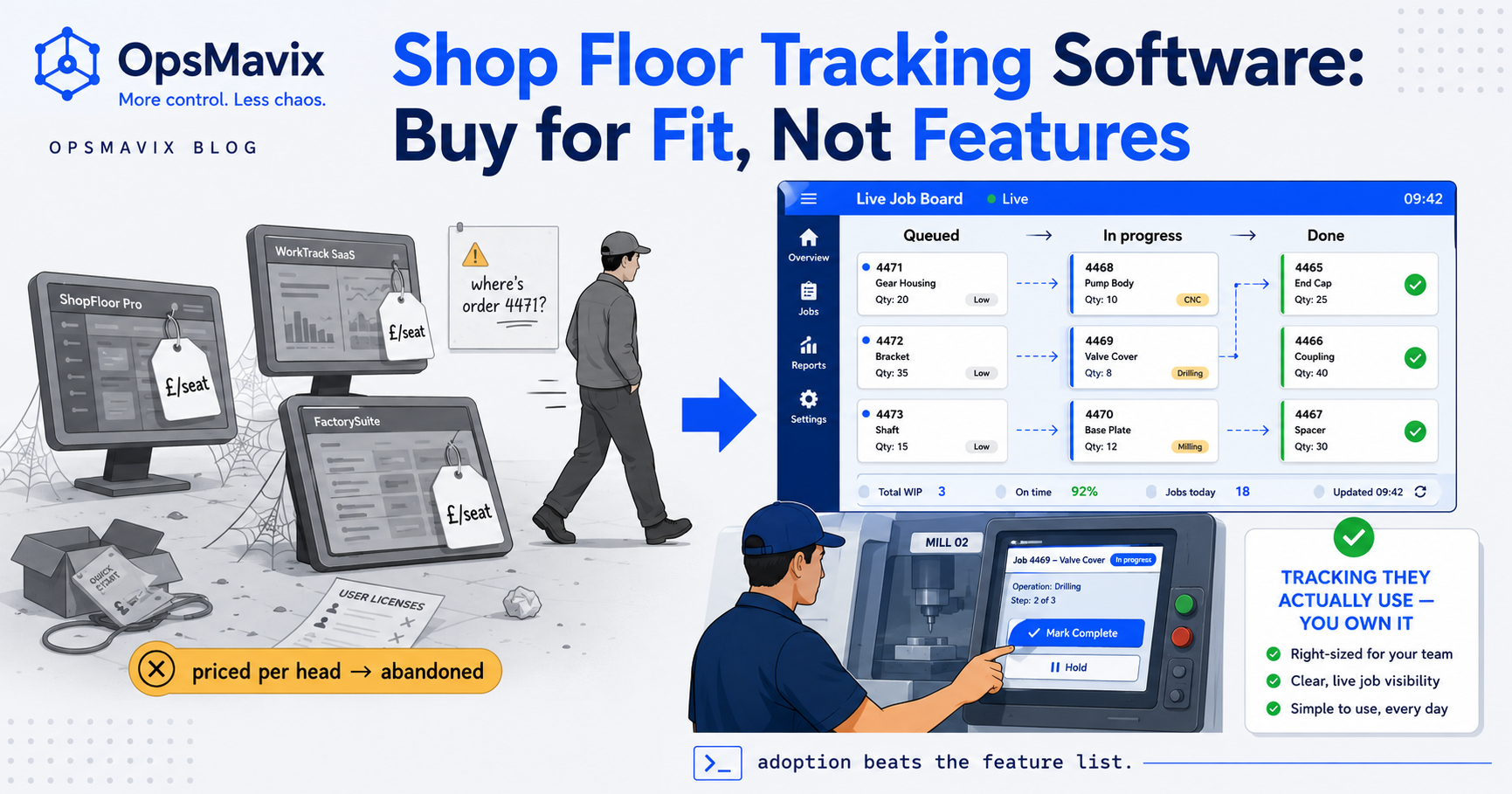
Shop floor tracking software is the system that tells you, without walking the floor or ringing a supervisor, what’s actually happening in production right now — which job is at which workstation, what’s finished, what’s waiting, and how long each step genuinely took. It replaces the whiteboard, the clipboard, and the spreadsheet someone updates from memory at the end of the shift with a live record that the people doing the work keep current as they go. Done well, it turns “where’s order 4471?” from a phone call into a glance.
This is a commercial buyer’s guide, not a how-to. If you’re comparing shop floor tracking systems — named products, per-seat SaaS, an ERP module, or building your own — the hard part isn’t finding software that logs a job. Dozens do. It’s finding one the floor will actually use every day, that fits how your shop really runs, and that you won’t abandon in six months because it was built for a factory ten times your size. This post covers what the software does, what to look for, why so many rollouts die quietly on the floor, and when building a right-sized system beats buying.
Key Takeaways
- Shop floor tracking software gives you a real-time picture of production — job status, station location, completion, and actual time per step — instead of a stale end-of-shift guess.
- Adoption on the floor is the whole game. The best-featured system is worthless if operators won’t log to it; in our experience, per-seat SaaS priced per head is one of the most common reasons tracking gets abandoned.
- Look for these first: fast real-time capture, works on the hardware you already have, a status model that matches your actual routing, honest reporting, and a price that doesn’t punish you for adding floor staff.
- Build-vs-buy hinges on fit, not features. Off-the-shelf wins when your process is standard; a custom system wins when your routing, terminology, or workflow is the thing that makes the product not fit.
- The enterprise MES is real and sometimes right — but often a cannon aimed at a fly for a shop that just needs to know where each job is and where work stalls.
- Right-sized means owned, not rented: captures exactly your workflow, runs on the tablets and scanners you have, charges you nothing per extra operator, and can’t be switched off by a vendor.
What Shop Floor Tracking Software Actually Does
Strip away the marketing and every shop floor tracking system does the same core job: it records the state of work as it moves through production and makes that state visible. An operator marks a job started at cutting, finished at cutting, started at assembly; the system stamps who, what and when, and the office sees it without asking. The good ones add the two things a whiteboard can’t — a reliable history of how long each step actually took, and an at-a-glance view of where work is piling up right now. That live picture is the point; we cover the concept in depth in what a production monitoring system is.
Beyond the core, features fan out fast: labour and job costing from captured times, scheduling and dispatch, quality checks and scrap logging, machine data capture, scanning, and office dashboards. Most buyers don’t need all of it on day one, and buying it all on day one is a common way to end up with a system too heavy for the floor to keep fed. Every feature the operator has to interact with is another reason for them to stop.
What to Look For, in Priority Order
Feature checklists sort products the wrong way round — they rank on capability when the thing that decides success is fit and adoption. Put these at the top, roughly in order. First, speed of capture. If marking a job done takes more than a few seconds — a login, three menus, a mandatory field nobody has the answer to — the floor will route around it, and stale data is worse than none because you’ll trust it. Second, the hardware it runs on. A system that needs new terminals at every station is a capital project; one that runs on a tablet, a phone, or the scanner you already own is a Tuesday.
Third, whether the status model matches your routing. Off-the-shelf tools ship an opinion about how a job flows — stages, states, terminology — and if it doesn’t match your shop, you either bend your process to the software or fight it forever. Fourth, honest reporting: actual time per step and where work stalls, not a vanity dashboard of green ticks. Fifth, the pricing model — covered on its own below because it quietly decides more rollouts than any feature does. Integration with accounting or inventory matters too, but it’s second-order: a system that’s used and slightly siloed beats a beautifully integrated one nobody keeps current.
Why Per-Seat SaaS Gets Abandoned on the Floor
Here’s a failure pattern we see behind a lot of dead tracking rollouts, and in our experience it’s rarely the features that kill it. Per-seat SaaS charges you per named user, which collides head-on with how a shop floor actually works. You’ve got twelve operators, three shifts, seasonal temps, agency staff covering a rush — and a licence model that bills for every one of them. So the finance-minded response is to buy a handful of seats and have people share a login, which destroys the one thing tracking exists to give you: who did what. The moment logins are shared, the audit trail is fiction and the labour data is noise.
Even where seats are paid for, per-head pricing sets up a slow-motion abandonment. Adding a terminal for a new hire now costs money, so stations get skipped, coverage goes patchy, the picture develops holes — and a picture with holes stops being trusted, at which point people quietly go back to the whiteboard while you pay a subscription for a system nobody looks at. The tool didn’t fail technically; its commercial model was hostile to the floor. It’s the same trap we walk through in tracking shop floor jobs without an ERP: the licensing, not the software, is what quietly gets it dropped.
Build vs Buy: It’s a Fit Question, Not a Feature Question
The instinct is to compare build-versus-buy on capability — can the off-the-shelf tool do X? — but that’s the wrong axis. Almost any mature product can be configured to do most things. The real question is how much of your process you’ll have to distort to fit the product’s assumptions, and what that distortion costs you every day forever. Buy when your process is genuinely standard: discrete jobs, conventional routing, terminology the software already speaks. An off-the-shelf tracker is then faster and cheaper to stand up, and building your own would be reinventing a solved problem.
Build when the thing that makes the product not fit is the thing that makes your business work. If your routing is unusual, your job terminology is specific to your trade, you run mixed make-to-order and stock, or your floor process is a competitive edge rather than a generic flow — then bending it to a product’s fixed model is a permanent tax, and a system shaped to your workflow pays back fast. We don’t re-argue the mechanics here; if you’re leaning that way, our production tracker build guide covers the how. The point for this decision is simpler: choose on fit, and be honest about whether you’re a standard shop or not.
What “Right-Sized” Shop Floor Software Looks Like
Between the spreadsheet that can’t keep up and the enterprise suite that’s too heavy sits the size most shops actually need, and it has a recognisable shape. It captures exactly your workflow — your stations, your states, your language — so nobody’s translating in their head. It runs on hardware you already have: a tablet at each cell, a phone in a pocket, the scanner on the wall, no capital project. Marking a step done is a tap or a scan, not a form. And critically, it charges you nothing per extra operator, because the whole point is total coverage across every head and every shift.
Right-sized also means owned, not rented — a system no vendor can switch off, re-price per seat, or sunset because it didn’t fit their roadmap. The reporting tells you the two things that move money: where jobs actually spend their time, and where work reliably stalls, instead of a wall of metrics you’ll never act on. This is the shape OpsMavix builds toward under manufacturing production tracking: not more software than the floor can feed, and not less than the office needs to trust.
Where MES and ERP Modules Genuinely Fit
Being fair about the heavy tools matters, because sometimes they’re the right answer. A full manufacturing execution system earns its complexity in high-volume, regulated, or highly automated plants — machine-level data capture, tight genealogy and traceability for compliance, deep scheduling, integration across many lines. If a wrong or missing record triggers a recall or an audit finding, the rigour of an MES isn’t overkill; it’s the point. The same goes for an ERP’s shop floor module when the rest of your business already lives in that ERP.
The mistake is reaching for that weight by default. Most small and mid-sized shops don’t need machine genealogy or plant-wide scheduling — they need to know where each job is and where work stalls, and to trust the times they quote from. Buying an MES to solve that is a cannon aimed at a fly: long implementation, per-seat licensing, a floor UI built for a plant, and a maintenance burden that outlasts the enthusiasm. If you’re weighing the broader category, factory management software covers where the all-in-one suites help and overshoot.
The Honest Test Before You Buy Anything
Before you sign for any shop floor tracking software, run the decision through three questions the vendor won’t ask:
- Will the floor actually use it every shift? Watch a real operator log a real job on a busy day.
- Does it fit our routing, or are we bending our process to its model? Count the workarounds.
- What does it cost as we grow? Price it at the operator count you’ll actually reach, not today’s.
FAQ
What is shop floor tracking software?
Shop floor tracking software records and displays the real-time status of work moving through production — which job is at which workstation, what’s started, finished or waiting, and how long each step actually took. It replaces whiteboards, clipboards and end-of-shift spreadsheets with a live record that operators keep current as they work, so the office can see production status without walking the floor or ringing a supervisor.
What should I look for in a shop floor tracking system?
Prioritise fit and adoption over feature count. Look first for fast capture (marking a step done in seconds, not a form), hardware you already own (tablet, phone, existing scanner), a status model that matches your actual routing, honest reporting on real step times and stalls, and pricing that doesn’t charge per operator. A system that’s used and slightly siloed beats an integrated one nobody keeps current.
Why do shop floor tracking rollouts get abandoned?
Usually friction and pricing, not features. If logging a job is slow, the floor routes around it and the data goes stale. If the software is priced per named user, shops either share logins — which destroys the who-did-what record — or skip terminals to save money, leaving gaps that make the whole picture untrustworthy. Once the picture has holes, people quietly revert to the whiteboard while the subscription keeps billing.
Should I build or buy shop floor tracking software?
Decide on fit, not features. Buy off-the-shelf when your process is standard — discrete jobs, conventional routing, terminology the product already speaks. Build a right-sized custom system when your routing, terminology or workflow is unusual enough that you’d be permanently bending your process to fit a product’s fixed model, or when per-seat pricing would cap the coverage you need. Custom wins on fit and ownership, not on being more elaborate.
How OpsMavix Can Help
OpsMavix builds right-sized shop floor tracking for businesses stuck between a whiteboard that can’t keep up and an MES that’s too heavy for how they run — too messy for the spreadsheet, not ready for a full enterprise suite. Instead of renting seats in a product built for a different factory, you get a system shaped to your floor: your stations, your states, your language, capturing each step in a tap or a scan on the tablets and scanners you already have. It charges nothing per operator, so you can cover every head on every shift, and it reports the two things that move money — where jobs really spend their time, and where work reliably stalls. You own it outright, and no vendor can switch it off or re-price it — whether that’s manufacturing production tracking on the floor or a live picture the office finally trusts.
If a missing shop floor picture is costing you — jobs you can’t locate, quotes priced off guessed times, late orders nobody saw stalling — start by seeing the leak. Book a Free Operations Leak Audit and we’ll map what the gap costs you today, what it’s worth to close, and whether a right-sized system or an off-the-shelf tool is the honest fit for how your shop runs now.