
Supply Chain Management Software UK: Costs & Buying Guide
Compare six supply chain software options, understand their costs and test how they handle supplier delays, stock shortages and purchasing decisions.
By OpsMavix. Product and pricing sources checked on 9 September 2026.
A supplier moves a delivery from Tuesday to Thursday. Your stock report still shows enough units to cover the week. Which customer orders will now be late, and what should your buyer do today?
That is a useful test of supply chain management software.
For UK businesses that buy, make or sell physical products, the right system connects demand, purchasing, stock, production and fulfilment. It should show how a change in one part of the operation affects the others, with someone responsible for resolving the problem.
This guide compares six software options, explains their different scopes and published starting prices, and provides a worked shortage example, a three-year budget and a practical demo checklist.
About this comparison: OpsMavix builds custom operations systems and is included below. The comparison uses public vendor documentation, with business-fit recommendations based on our assessment. It is not a hands-on product benchmark. All numerical business examples and the illustrated supplier records are hypothetical.
What is supply chain management software?
Supply chain management software, often shortened to SCM software, helps businesses coordinate the movement of materials, products and related information from suppliers through to customers. Depending on the product, it can cover demand forecasting, purchasing, inventory, manufacturing, warehousing, transport and supplier performance.
The category contains different types of software:
- Planning software helps decide what to buy, make or move, in what quantity and by which date.
- Execution software manages activities such as receiving goods, producing orders, picking stock and despatching deliveries.
- Broader platforms connect several of these activities, sometimes with finance and other ERP functions.
Each of those categories is sold as a set of modules. For what each module does and who can safely skip it, see our breakdown of supply chain management software modules.
For a growing product business, the best starting point is the decision your current tools cannot support reliably. A wholesaler struggling with late inbound stock has different requirements from a manufacturer scheduling shared machines or a contractor checking subcontractor credentials.
Supply chain management software UK: six options compared
These products cover different scopes. Use the table to build a shortlist, then compare proposals for the same users, workflows and transaction volumes.
| Software | Worth considering when… | Published starting price or pricing approach | Important buying detail |
|---|---|---|---|
| Unleashed | Purchasing, stock and sales need to work together alongside your accounts system. | Core: US$399/month, paid monthly, excluding applicable taxes, on the global page checked. | Includes three users and 100 sales orders/month. Forecasting, additional capacity and other modules affect the quote. |
| MRPeasy | Materials, bills of materials and production planning drive your requirements. | Starter: US$49/user/month at the displayed monthly rate. | Check the tier: quality control is listed in Professional; multiple production sites and sales forecasting are in Enterprise. Confirm tax treatment. |
| Microsoft Dynamics 365 Business Central | You want purchasing, inventory, planning and finance within an SME ERP. | Essentials: £61.50/user/month, paid yearly, excluding VAT. | Premium adds manufacturing and service management at £84.60/user/month on the same billing basis. Implementation is additional. |
| Sage X3 | Manufacturing or distribution requires broader operational, financial and multi-entity control. | Request a scoped quote. | Demonstrate your production methods, traceability and company structure before choosing the implementation scope. |
| Microsoft Dynamics 365 Supply Chain Management | You are evaluating a substantial supply-chain platform with dedicated implementation resources. | Base plan: £161.50/user/month, paid yearly, excluding VAT. | Premium is £230.70/user/month. Demand-planning entitlement differs; check minimum purchase requirements and licensing eligibility with the supplier. |
| OpsMavix | You need an owned system built around specific operational workflows. | Starter Fix: £3,000–£10,000; Growth System: £10,000–£25,000; Operations Platform: from £25,000. | These are different project scopes, not interchangeable SCM packages. Confirm included integrations, ongoing costs and handover. |
Prices were checked on 9 September 2026. They are starting points, not equivalent implementation quotes. Dollar prices remain in dollars; ask for a UK commercial proposal before budgeting. Billing terms, taxes, support and optional features vary.
Unleashed: check the planning package as well as stock control
Unleashed is worth assessing when your purchasing and sales processes need a dependable inventory foundation. Its Advanced Inventory Manager adds forecasting and material requirements planning. The published page lists this at US$149/month with Core and included with Pro. Unleashed plans and modules.
Bring your peak monthly order volume and required connections into the quote. In the demo, change a supplier delivery date and ask what happens to replenishment suggestions and customer availability.
MRPeasy: start with a real manufacturing job
MRPeasy lists production planning, BOM management and lot traceability among its Starter functions. More specialised requirements sit in higher plans. MRPeasy feature comparison.
Use one of your actual product structures in the trial. Change a component delivery date, record a partial completion and ask how the plan responds. Check whether your mix of purchased parts, subcontracted work and production resources fits the proposed configuration.
Business Central: consider whether finance belongs in the project
Business Central Essentials includes purchasing, inventory, supply chain planning and warehouse management alongside finance. Manufacturing is included in Premium. Microsoft’s Business Central plan comparison.
It belongs on the shortlist when the business wants a shared operational and financial system. Ask the implementation partner to separate standard functionality, configuration and paid extensions in the proposal.
Sage X3: test the complexity you actually have
Sage X3 documents discrete, process and mixed-mode manufacturing, lot and recall controls, and multi-entity operations. Sage X3 capabilities.
Those capabilities make it a candidate for more involved product operations. Take a difficult production or distribution example into the demonstration. Ask which functions are included in the proposed deployment and which depend on additional work.
Dynamics 365 Supply Chain Management: examine licensing and planning depth
Microsoft’s pricing page distinguishes the base SCM plan from Premium and lists limited demand planning in the base plan. Dynamics 365 SCM pricing.
Have the supplier document the complete licence mix, minimum commitments, integrations and implementation responsibilities. A displayed user price is not the minimum cost of an enterprise deployment.
OpsMavix: define the workflow and ownership responsibilities
OpsMavix offers owned operations builds, from a focused workflow through to broader ERP projects. The published pricing model has no OpsMavix per-seat fee; hosting and optional care are separate. Its current pricing page states that VAT is not added to its listed prices. OpsMavix pricing and scope.
A custom build is worth considering when your requirements are specific and established software leaves a material gap. If a standard application already fits at an acceptable total cost, that may be the better purchase. Define access, documentation, maintenance and changes before commissioning a build.
SCM vs ERP, MRP and inventory software
These terms overlap. Comparing them as completely separate categories can lead you to buy capabilities you already have.
| System type | Main buying question | What to investigate |
|---|---|---|
| Inventory software | What stock do we have, where is it and how is it changing? | Locations, reservations, purchasing, movements and stock accuracy. Some products also include planning. |
| MRP software | What materials must we buy or make to meet production demand? | Bills of materials, stock netting, lead times and purchase or production recommendations. Check capacity scheduling separately. |
| ERP software | Can our departments operate from connected commercial, financial and operational records? | Finance, purchasing, sales, stock and any required manufacturing modules. |
| SCM software | How do demand, supply and delivery decisions affect one another? | Planning and execution across the parts of the supply chain you need to coordinate. |
An ERP can contain substantial SCM functionality. An inventory application can also meet a smaller business’s purchasing and replenishment needs. Start by checking the capabilities and configuration of your existing software.
For a narrower stock-and-sales comparison, see our wholesale inventory management software guide.
The features that deserve a proper demonstration
Demand and supply on the same timeline
The system should connect dated demand with usable stock and expected receipts. A purchase order due next month cannot cover a customer order due tomorrow.
If you use forecasts, ask how actual sales consume them. Adding an entire forecast to orders that already form part of that forecast can overstate demand. Microsoft documents this distinction in its explanation of balancing supply and demand.
Supplier acknowledgements and changing delivery dates
Record when an order was requested, what the supplier confirmed and the latest expected receipt. Keep the history when those dates change.
Ask the system to identify missing acknowledgements, overdue lines and the customer orders or production jobs affected. An alert is more useful when it has an owner and a next action.
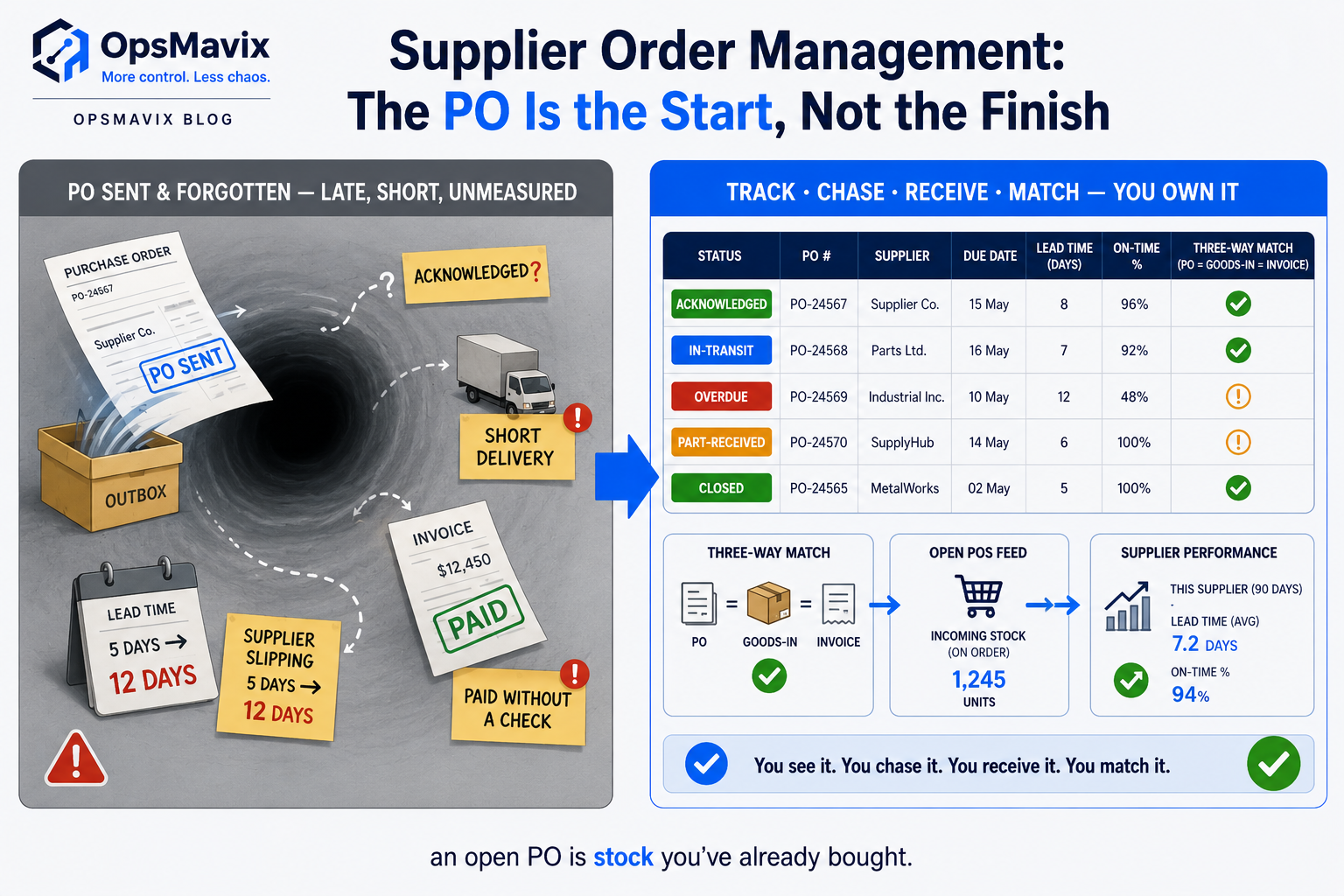
Illustrative supplier records. Connect each changed delivery date with the demand that depends on it.
Usable inventory and realistic replenishment
Separate physically present stock from quarantined, damaged or otherwise unavailable quantities. Keep receipts at the correct site and in the correct unit of measure.
Test minimum order quantities, carton multiples and partial deliveries. The software should explain the suggested quantity and date, including what is already on order. Decide explicitly how your safety-stock policy affects warnings and purchases.
Production requirements, where relevant
For manufacturers, ask how a sales requirement becomes component demand and a production plan. Check BOM versions, expected yield, subcontracted operations and the availability of machines or labour where these affect delivery.
A material availability calculation does not, by itself, prove that the factory has capacity to finish the job on time.
Connected receiving, fulfilment and returns
Receive less than the ordered quantity and check the remaining balance. Then reject some units during inspection. The system should reflect what can actually be used or sold.
Follow the consequences through customer promises, warehouse work and purchasing. If supplier communication is the main gap, our supplier order management guide covers the inbound process in more detail.
Integration failures that someone can resolve
Ask what happens when an order, stock movement or receipt fails to reach another application. Look for a visible error, a responsible person and a safe way to retry without creating duplicates.
For UK operations, also check working-day calendars, bank holidays, delivery cut-offs, currencies and your actual accounts-system connection. An integration logo is a starting point for a test, rather than evidence that every required transaction is covered.
Worked example: enough stock for the week, but a Wednesday shortage
Imagine a distributor starts Monday with 180 usable units of an item. A purchase order for 120 units was due Tuesday, but the supplier now expects delivery on Thursday.
Customer demand is 60 units on Monday, 80 on Tuesday, 90 on Wednesday and 40 on Thursday. Assume receipts become usable before that day’s despatches, with no other demand, receipts or safety-stock requirement.
| Day | Customer demand | Expected usable receipts after the delay | Projected closing balance |
|---|---|---|---|
| Monday | 60 | 0 | 120 |
| Tuesday | 80 | 0 | 40 |
| Wednesday | 90 | 0 | −50 |
| Thursday | 40 | 120 | 30 |
The calculation is:
Previous projected balance + usable receipts − demand = new projected balance.
Across the four days, total supply is 300 units and total demand is 270. An aggregate report therefore looks comfortable. The dated plan exposes a 50-unit shortage on Wednesday.
The negative balance represents unmet demand, not physical stock below zero. If those 50 units remain on backorder, Thursday’s receipt can cover that backlog and Thursday’s 40-unit demand, leaving 30 units.
What the software should help your team do
- Identify the Wednesday orders affected by the missing 50 units.
- Check whether 50 units can arrive in time through an expedited shipment or an approved transfer.
- Compare the cost and feasibility of that response with an agreed change to customer delivery promises.
- Record the decision, owner and confirmed replacement date.
- Recalculate the plan without treating the original 120-unit purchase order as cancelled or ordering it again accidentally.
Suppose an alternative supplier can deliver the missing 50 units on Wednesday for an extra £2 per unit plus £35 freight. The additional cost is £135. That is an illustrative decision cost, not a claimed saving: whether it is worthwhile depends on margin, service commitments and the alternatives.
Bring this example into a demo. Ask the supplier to change the receipt date while you watch. Seeing the affected orders and a traceable response is more informative than seeing a general stock dashboard.
How much does supply chain management software cost?
The subscription or build price is only one part of the budget. Compare costs over the same period and for the same operating requirements.
Include software licences, implementation, migration, integrations, staff time, training, support, hosting where applicable, and future changes. Also ask what it costs to export usable data and move away at the end of the relationship.
A three-year budget example
Assume six users require Business Central Essentials at the published £61.50/user/month rate. The licence calculation is:
6 × £61.50 × 36 months = £13,284.
The remaining figures below are hypothetical planning allowances, not Microsoft or partner quotes. The example assumes the licence price and user count stay unchanged for three years and excludes VAT.
| Cost item | Example three-year allowance |
|---|---|
| Six Essentials licences | £13,284 |
| Configuration and implementation | £9,000 |
| Data migration and integration work | £3,000 |
| Internal staff time and training | £6,000 |
| Ongoing support: £150 × 36 months | £5,400 |
| Data export and transition allowance | £1,200 |
| Total | £37,884 |
The licence figure comes from Microsoft’s published UK pricing. The example shows why a user price alone is an incomplete project budget. It does not estimate the typical cost of a Business Central implementation.
For a custom proposal, replace the licence line with the build price and include hosting, maintenance, support and future development on the same basis. Ownership changes the commercial arrangement; it does not remove operating responsibilities.
Ask each supplier to price a second scenario with your expected growth in users, orders, sites and integrations. A quote that works today should also make those future costs understandable.
A practical checklist for choosing SCM software
1. Define the operational problem
Write down the recurring failure and its consequence: late customer orders, excess purchases, unplanned production stoppages or manual reconciliation. Collect examples and establish a baseline before setting an improvement target.
2. Agree which records each system owns
Decide where products, supplier dates, purchase orders, stock movements and customer promises are maintained. If two systems can update the same information, define how conflicts are resolved.
3. Run the same demo tests with every supplier
Use a late purchase order, a partial receipt, a rejected batch, an order cancellation and an integration failure. Ask a buyer or warehouse user to complete the task, not just a salesperson.
Record whether the result is available as standard, needs configuration, requires an add-on or depends on custom work. Put the agreed answers in the proposal.
4. Score the evidence
An example weighting is 30% operational fit, 25% data and integration handling, 20% total cost, 15% usability and support, and 10% handover and exit arrangements.
Score each category from zero to five, then multiply by its weighting divided by five. Adapt the weights to your business. Treat a failed essential requirement as a blocker even if the total score looks good.
5. Start with a controlled pilot
Choose a manageable product group or workflow with representative exceptions. Reconcile opening stock and open orders, train the responsible users and define acceptance criteria before launch.
Agree how the business will keep operating if the pilot needs to be paused or reversed. Expand only when the data and workflow are dependable.
Measure whether the new system improves the operation
A dashboard becomes useful when its measures have clear definitions and lead to decisions.
| Measure | A practical definition to agree | What to investigate |
|---|---|---|
| Supplier on-time, in-full performance | Eligible PO lines received in full as accepted goods by the agreed baseline date, divided by eligible lines due. | Which suppliers and items repeatedly miss the requirement? |
| Actual supplier lead time | Time from the agreed start event, such as PO confirmation, to usable receipt. Define partial-receipt treatment. | Are planning lead times based on recent experience? |
| Customer orders at risk | Open orders whose dated requirements cannot be covered by eligible supply. | Who is resolving each exception, and by when? |
| Expedite spending | Additional freight and purchase premiums incurred to recover supply problems. | Which recurring failures are creating avoidable costs? |
For example, 36 qualifying PO lines received on time and in full out of 40 due gives 90% under that definition. Keep original promise dates as well as revisions; overwriting a missed date can hide the problem.
Agree exclusions and reporting periods before comparing suppliers. Track service alongside stock investment so improved availability is not mistaken for efficiency when it simply comes from holding more inventory.
Frequently asked questions
What is the best supply chain management software for a small UK business?
The best fit depends on the gap. A purchasing-and-stock application may be enough for a distributor. A manufacturer may need MRP and scheduling. A business replacing disconnected finance and operations may need ERP. Shortlist by workflow and verify the proposed configuration with your own data.
Do we need SCM software if we already have an ERP?
Check your ERP first. Relevant planning or execution capabilities may already be available but poorly configured or underused. A separate planning tool or custom extension can make sense where there is a specific unmet requirement and a dependable integration.
Can supply chain software prevent stockouts?
It can help expose shortages earlier and support better replenishment decisions. It cannot guarantee supply. Inaccurate records, unexpected demand, supplier failures and unresolved alerts can still cause stockouts. Assess the process for responding to a warning as well as the calculation that creates it.
Is forecasting the same as a reorder alert?
No. A simple reorder alert flags a threshold. Forecasting estimates future demand, which a planning process combines with supply, lead times and purchasing rules. Ask how the software deals with seasonality, unusual orders and forecast consumption.
Can we keep Xero or another accounting package?
Potentially, depending on the software and integration. Test the actual transactions you need: supplier records, receipts, bills, credit notes and stock valuation where relevant. Agree which system owns each record and who resolves reconciliation errors.
How long does implementation take?
It depends on scope, data quality, integrations and the team’s availability. A focused workflow and a multi-site platform are different projects. Ask for milestones covering data preparation, configuration, testing, training, launch and post-launch support, with responsibilities assigned to both sides.
Is custom supply chain software cheaper than a subscription?
Sometimes, but it is not automatically cheaper. Compare equivalent functionality over several years, including build work, licences, hosting, maintenance, integrations and changes. A standard product that fits well can offer better value; a custom build needs a clear operational and commercial case.
How OpsMavix can help
OpsMavix builds operations systems for UK product businesses, including connected purchasing, stock, production and order workflows.
Start with one difficult question: when a supplier changes a delivery date, can your team see every customer order or production job affected?
If answering that requires several spreadsheets and a round of messages, bring the example to an Operations Leak Audit. We can map the gap, identify the systems involved and assess whether configuration, a focused build or a broader project makes sense.
You can also review our current project price bands before getting in touch.