
ChatGPT 6 Astra: You’re Paying More and Getting Less—The Grand Scheme
The demos make GPT-6 Astra look ready for anything. Your subscription still has limits. Here is what the five-hour window actually means, what your plan includes, and how to judge whether the results justify the cost.
You watch the demos. You picture the website you could build, the research you could finish, the work you could finally hand over. You hand over $20 for Plus. Then you send two real prompts — and the allowance is gone.
This is not an exaggeration. It is a documented experience reported by some paying subscribers after the GPT-6 Astra launch.
On the $20 ChatGPT Plus plan, one demanding Astra task can consume most or all of your five-hour Work and Codex allowance. OpenAI itself warns that the five-hour window is an allowance, not a promise of five hours of work: larger inputs and outputs, higher reasoning settings, Fast mode and multi-step tasks can all increase usage. One documented Plus user went from 100% to 42% after one Astra Medium coding turn, then from 42% to 0% after the second before the task was finished. (OpenAI Help Center, GitHub issue #42987)
Other launch-period reports described similarly fast depletion during coding and browser-heavy tasks. These are individual reports rather than representative averages, but they show why the headline message count does not tell you how much finished work your subscription will actually buy. (CoinPost, Sandbase, Ultimate Pocket)
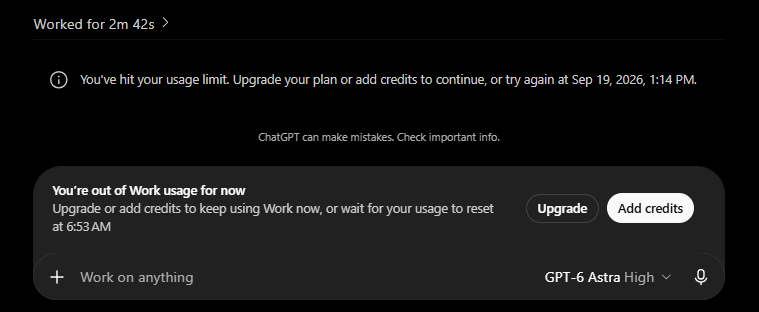
What are GPT-6 Astra usage limits?
OpenAI publishes estimated local messages per five-hour period for Work and Codex. These are not fixed message caps. Actual consumption varies by task, model, reasoning setting, input/output size and other settings, and weekly limits may also apply.
| Plan | GPT-6 Astra estimated local messages / 5h |
|---|---|
| Plus ($20) | 5–45 |
| Pro 5× ($100) | 25–225 |
| Pro 20× ($200) | 100–900 |
| Business Standard | 5–45 |
Source: OpenAI — Managing usage with GPT-6 Astra in Work and Codex.
That range matters. Five messages and forty-five messages are completely different working sessions, and neither number tells you how long a complex task will run. OpenAI explicitly says you can hit the five-hour limit before five hours have passed.
How Astra compares with GPT-5.6 on the same Plus plan
| Model (Plus) | Estimated local messages / 5h | Approximate allowance vs Astra |
|---|---|---|
| GPT-6 Astra | 5–45 | 1× |
| GPT-5.6 Sol | 10–100 | about 2× |
| GPT-5.6 Terra | 25–200 | roughly 4–5× |
| GPT-5.6 Luna | 250–2,000 | far higher for lightweight work |
Source: OpenAI usage guidance.
This does not mean every Sol task will last exactly twice as long as the same Astra task. OpenAI says different models can consume different amounts of allowance for the same task. The useful takeaway is simpler: using the flagship model has a materially smaller included allowance than using the cheaper 5.6 models.
Plus also includes Astra in Work and Codex, but it does not include GPT-6 Pro in ordinary Chat. GPT-6 Pro, powered by Astra, is available in Chat on eligible Pro, Business and Enterprise plans. (OpenAI Help Center)
Two prompts, then the wall: a real reasoning-effort case study
A particularly clear example was posted in OpenAI’s public Codex GitHub repository on September 5, 2026.
The user reported:
- ChatGPT Plus subscription
- GPT-6 Astra
- Medium reasoning effort
- A normal Unity repository task involving file reads, a small multi-file change, a test, a failed test diagnosis and a follow-up fix
- Start: 100% of the five-hour allowance
- After the first turn: 42% remaining
- After the second turn: 0% remaining
- The second turn hit the usage limit before the task finished
The reported code change at that point was only around four files, with 165 insertions and seven deletions. (GitHub issue #42987)
That does not prove every Medium-reasoning task will behave the same way. It does demonstrate something important: a prompt that looks small to the user can trigger a much larger agentic workload underneath.
OpenAI confirms the factors that can raise consumption: larger inputs and outputs, higher reasoning effort, Fast mode and multi-step tasks. (OpenAI Help Center)
Consider a prompt like:
The sentence is short. The work is not. It can require reading files, writing pages, generating or handling assets, checking layouts, testing forms, fixing errors and repeating those steps. Your allowance is consumed by the work performed, not by the number of words in your prompt.
Fast mode: 2.5× usage in Work and Codex, 2× API token pricing
This is an easy place to mix up two different billing systems.
ChatGPT Work and Codex Fast mode
For GPT-6 Astra in Work and Codex, OpenAI lists Fast mode at 2.5× the Standard usage or credit rate. That means Fast mode can drain the same included allowance faster. It does not mean you can safely divide the 5–45 message estimate by 2.5 and treat the result as a guaranteed message count. Real consumption still depends on the task. (OpenAI ChatGPT Rate Card)
API Fast mode
The API is separate. Standard Astra API pricing is $10 per 1M input tokens and $50 per 1M output tokens for short-context requests. API Fast mode lists $20 per 1M input tokens and $100 per 1M output tokens for short context — 2× standard token pricing. (GPT-6 Astra API model, OpenAI API Fast mode)
So:
- Work/Codex Fast mode: 2.5× Standard usage/credit rate
- API Fast mode: 2× standard short-context token pricing
- They are different systems and should not be treated as interchangeable
The grand scheme: how the pricing ladder works
Look at the product structure as a whole and the upgrade ladder becomes clear:
- Plus ($20) includes Astra in Work and Codex, but not GPT-6 Pro in ordinary Chat.
- Astra has a smaller included Work/Codex allowance than GPT-5.6 Sol, Terra or Luna on the same plan.
- Complex tasks can consume that allowance much faster than a simple message count suggests.
- Higher Pro tiers increase the estimated Astra allowance: Pro 5× is listed at 25–225 local messages per five-hour window and Pro 20× at 100–900.
- Additional paid usage can sit on top of the subscription. Depending on the account and product, eligible users may see purchased credits or purchased instant resets. API usage is billed separately.
Banked resets are different: OpenAI describes them as promotional benefits, not purchased credit, cash or API credit. (OpenAI banked reset guide)
This is an editorial reading of the product ladder, not evidence about OpenAI’s intent. The practical issue for buyers is the gap between having access to the flagship model and having enough included usage to finish the work they bought it for.
Launch confusion added another layer. OpenAI says the reset offers during September 3–7 covered the broader Astra launch delay, while separate reporting described frustration around the staggered rollout. (OpenAI Help Center, The Verge)
The benchmarks are real. They do not price your project.
OpenAI presents Astra as its most capable model for difficult end-to-end work, including coding, research, computer use and complex reasoning. (GPT-6 Astra API model)
Independent evaluation also shows strong results. MathArena’s September 15 update reported roughly 81% on BrokenArXiv August and 88% on ArXivMath August for Astra in its updated evaluation setup. Benchmark versions matter because the questions and evaluation methodology can change. (MathArena)
A benchmark tells you something about performance on that benchmark. It does not tell you how much of your Plus allowance a customer dashboard, research brief, browser audit or debugging session will consume.
That is the buying question that matters: what does it take to get a result you can actually use, and how many attempts do you get?
API-specific usage limits and pricing
The API is not the same thing as the allowance included with ChatGPT Plus or Pro.
GPT-6 Astra currently has:
| API specification | GPT-6 Astra |
|---|---|
| Context window | 1,050,000 tokens |
| Maximum output | 128,000 tokens |
| Standard input | $10 / 1M tokens |
| Standard cached input | $1 / 1M tokens |
| Standard output | $50 / 1M tokens |
| Fast input, short context | $20 / 1M tokens |
| Fast cached input, short context | $2 / 1M tokens |
| Fast output, short context | $100 / 1M tokens |
Sources: OpenAI GPT-6 Astra model documentation and OpenAI API Fast mode.
OpenAI also applies long-context pricing above 272K input tokens. On standard Astra API requests above that threshold, input and cache rates are multiplied by 2× and output by 1.5× for the full request. The Fast mode page separately lists long-context Astra rates of $40 input, $4 cached input and $150 output per 1M tokens.
What does an Astra API task cost?
For a simple short-context example:
- 100,000 uncached input tokens at $10/M = $1
- 20,000 output tokens at $50/M = $1
- Standard total = $2
Run the same token volumes through short-context API Fast mode:
- 100,000 input tokens at $20/M = $2
- 20,000 output tokens at $100/M = $2
- Fast total = $4
That is an arithmetic illustration, not a measured project cost. Tool calls, repeated requests, long context and larger outputs can push the real total higher.
How to avoid burning Astra on work that does not need Astra
If you use the API, one of the simplest cost controls is workload routing: reserve Astra for the tasks that actually need the flagship model and send routine work to cheaper models.
Current OpenAI standard API prices are:
| Model | Input / 1M tokens | Output / 1M tokens | Typical role |
|---|---|---|---|
| GPT-6 Astra | $10.00 | $50.00 | Hardest end-to-end reasoning and agentic work |
| GPT-5.6 Sol | $4.00 | $20.00 | Complex professional work |
| GPT-5.6 Terra | $2.00 | $12.00 | Balance of capability and cost |
| GPT-5.6 Luna | $0.20 | $1.20 | Cost-sensitive, high-volume work |
Source: OpenAI model comparison.
For example, extraction, classification, short edits and repetitive transformations usually do not need your most expensive model by default. OpenAI itself positions Luna for focused or repetitive tasks and Terra for everyday work, while Astra is positioned for especially difficult problems.
The same principle helps with ChatGPT Work and Codex: start with the model and reasoning level that can realistically do the job, rather than automatically selecting the maximum setting.
How do GPT-6 Astra usage limits reset?
There are several different reset mechanisms, and they should not be confused.
Banked resets
A banked reset is a one-time reset saved to an eligible account until it is used or expires. A full banked reset can refresh both the five-hour and weekly Work/Codex usage windows and change the weekly reset date.
It does not permanently increase the plan’s normal allowance, and OpenAI says banked resets are not cash, purchased credit or API credit. (OpenAI banked reset guide)
During the Astra rollout, eligible existing Plus, Pro and Business users in good standing received banked resets on September 3 and September 4, 2026, subject to OpenAI’s eligibility conditions.
Automatic or global resets
An automatic reset is applied directly to eligible usage limits. It is not stored for later.
On September 7, 2026, OpenAI says it applied an automatic/global reset to eligible Plus, Pro and Business usage limits. It did not create another saved banked reset. (OpenAI usage guidance)
That is more precise than saying OpenAI simply “reset every paid subscriber.” Eligibility, plan, region, account status and availability can matter.
Purchased instant resets
OpenAI also documents purchased instant resets for eligible personal Plus and Pro accounts, depending on the account and billing country.
A purchased reset refreshes the five-hour and weekly Work/Codex allowance when checkout succeeds. It cannot be banked for later. The new weekly period starts with the first Work or Codex request after the reset, and the next automatic weekly reset is seven days after that request. (OpenAI usage guidance)
Before buying one, check which limit you actually hit. A missing model, an exhausted five-hour window and an exhausted weekly allowance are different problems.
Make the next Astra task easier to finish

Image: OpenAI Developers. Original prompting guide.
OpenAI’s developer guidance recommends revisiting instructions accumulated for older models. Requiring unnecessary document reads, repeated checks or excessive context can make an agent do more work than needed.
A practical way to test Astra’s value:
- Choose a real, repeatable task. Use something you already need to finish.
- Define success before starting. Specify the deliverable and the checks it must pass.
- Check Settings → Usage first. Record your remaining allowance, plan, model, reasoning level and speed setting.
- Start with the lowest reasoning level that can plausibly do the task. OpenAI notes that higher effort can consume more allowance and does not always produce a better result.
- Leave Fast mode off unless the speed is worth the extra usage.
- Review the deliverable before increasing reasoning. Missing files, permissions or instructions cannot be fixed by simply raising reasoning effort.
- Compare with GPT-5.6 Sol or Terra. If the same routine task finishes reliably on a cheaper model, reserve Astra for the work where its extra capability changes the outcome.
- Measure finished work, not prompts. If one task consumes most of a window, that is the usage pattern that matters to your workflow.
These are editorial recommendations, not results from a controlled OpsMavix experiment. One run will not establish a universal cost, but it can tell you whether Astra’s extra capability is worth its extra consumption for your specific workload.
Is GPT-6 Astra worth paying for?
Astra can make sense when the completed work saves enough time, solves a difficult enough problem or replaces enough manual effort to justify its higher consumption.
But access and usable capacity are not the same thing.
On Plus, OpenAI gives you access to Astra in Work and Codex while estimating only 5–45 local messages per five-hour period, with actual usage depending heavily on the task. A demanding agentic workflow can consume that allowance much faster than a buyer might expect from the plan name alone.
At OpsMavix, the useful test is not the benchmark headline. It is the finished output, the correction it still needs, the time saved and the amount of allowance or API spend required to get there.
Before upgrading or buying more usage, take one job you genuinely need Astra to finish. Record your starting allowance, run the task with a clearly defined success condition and inspect what remains.
If two turns consume the whole window, that tells you more about the value of the plan for your workload than any launch demo.
Related reading: Fly vs Chess: the experiment behind the search surge. Explore more technology and practical systems coverage on the OpsMavix blog.
About this article: Updated and fact-checked on 18 September 2026. Plan-limit, reset, model-availability, Fast mode and API-pricing claims are linked to current OpenAI documentation. Individual rapid-depletion examples are clearly identified as user reports rather than representative averages. OpenAI can change availability, limits, pricing and eligibility; your account’s current Settings → Usage screen and the latest OpenAI documentation take precedence.